



Human Resource Information Systems have become the operational backbone of HR teams—centralizing payroll, compliance, and employee data in one place. But as organizations grow more distributed and people-first, the problems with traditional HRIS platforms are harder to ignore—and understanding why these systems fall short is the first step to fixing them.
This guide covers the advantages and disadvantages of HRIS platforms, the seven limitations that surface most often, and what HR teams are doing to close each gap.
What HRIS Systems Do Well
An HRIS absorbs administrative work that would otherwise eat an HR team’s week. The core strengths:
- Payroll and benefits administration. Calculations, deductions, and disbursement run on a schedule.
- Compliance documentation. Tax forms, I-9s, retention schedules, and audit trails live in one system of record.
- Centralized employee records. Job history, compensation, and status changes sit in one place.
- Time and attendance. PTO balances, accruals, and approvals update automatically.
- Employee self-service. Employees update contact details and download pay stubs themselves.
For organizations managing headcount at scale, none of that is optional.
The Main Disadvantages of HRIS Systems
That’s often where the value stops. Most HRIS systems were architected for the compliance and payroll needs of the 1990s and 2000s. The workforce has changed dramatically; the platforms largely haven’t. The data backs this up:
- Only 32% of employees actually use their company’s HRIS regularly, according to Gartner research cited by SHRM.
- Nearly 1 in 4 organizations say their HR tech implementations fail to meet adoption expectations, per the Sapient Insights Group’s annual HR Systems Survey.
- 55–75% of ERP and HRIS implementations fail to meet their objectives, according to Gartner.
Seven gaps account for most of that shortfall. Each one is fixable.
HRIS Systems Lack Employee Engagement Features
Most HRIS platforms are built for administrators, not employees. For the average employee, the system exists to update a phone number, download a pay stub, or submit a PTO request—nothing more.
Those transactional touchpoints don’t build belonging, recognition, or career momentum—and a system employees never willingly open ends up invisible to the very culture it’s supposed to support. This is the core difference between an HRIS and dedicated employee engagement software: one stores records, the other builds connection.
Fix it: Layer in tools that give employees a reason to show up—peer recognition, personalized profiles, achievement tracking. The HRIS handles the back-end; the engagement layer makes it something people actually use. (For a deeper look at pairing the two, see how to maximize your HRIS with employee engagement solutions and our breakdown of the best employee directory software platforms.)
HRIS Systems Are Built for Compliance, Not Strategy
An HRIS is a system of record, not a planning tool. It documents what already happened; it won’t help you decide what happens next.
HRIS systems excel at what they were designed for: payroll accuracy, regulatory compliance, data storage. What they weren’t designed for: workforce planning, talent development, or DEI progress tracking.
The result is HR teams spending most of their time on operational maintenance, with little bandwidth left for the strategic work that actually moves the business.
Fix it: Integrate platforms that surface analytics, support goal tracking, and enable real-time collaboration—positioning HR as a strategic partner with the data to back it up.
HRIS Data Stays Fragmented Across Systems
One of the most common HRIS pitfalls: data exists, but it’s scattered. Employee performance lives in one system, engagement data in another, learning records somewhere else. No single view tells the full story.
Built-in HRIS reporting is typically limited to compliance metrics. Extracting anything more requires manual exports, spreadsheet reconciliation, and significant time—which means most insights arrive too late to act on.
This is also where HR-to-business alignment breaks down. When people data can’t be unified across HRIS, ATS, and LMS systems, workforce decisions get made on incomplete information.
Fix it: Connect your HRIS to tools that aggregate data across systems and surface actionable workforce insights—engagement trends, retention risk signals, skills gaps—rather than raw exports that require manual analysis. A real-time org chart that syncs automatically with your HRIS is often the fastest way to make structural data visible without manual upkeep.
What an HRIS Does Not Solve: Everyday Employee Search
An HRIS can’t tell you who owns the Salesforce integration, or who on the West Coast has worked on SOC 2. It holds the records but wasn’t built to answer the questions employees ask every day.
Org charts go stale between syncs. Most HRIS org charts show whatever the last data pull captured. Reorgs, interim managers, and contractors show up late or never, so employees stop trusting the chart and ask a colleague instead.
Discovery stops at exact-match names. HRIS search expects you to know who you’re looking for. New hires and cross-functional teams don’t—they search by problem, not by person. When search can’t cover roles, locations, tenure, projects, and expertise, only word of mouth fills the gap.
Skills data isn’t searchable, wherever it lives. Even when an HRIS has a skills field, nobody updates it and nothing surfaces it. Managers staffing a project guess, and internal mobility stalls.
Fix it: Add a searchable people layer on top of the HRIS. GoProfiles syncs with your HRIS and turns that record data into something employees can actually query—rich employee profiles with skills, interests, and project history, an org chart that updates as the HRIS does, and search that works by expertise rather than exact name. The HRIS stays the source of truth; the search layer makes it usable.
Poor HRIS UX Drives Low Adoption
Many HRIS platforms carry the weight of legacy design: clunky navigation, limited customization, outdated interfaces. Employees avoid the system, which defeats the purpose of having one at all—and when managers and employees route around the platform, HR manages tasks both inside and outside it, recreating the very inefficiencies the HRIS was supposed to eliminate.
Fix it: Modern HR tools with intuitive UX and mobile compatibility can wrap around your HRIS and fill the experience gap—giving employees and managers interfaces they’ll actually use without requiring a platform overhaul.
HRIS Systems Offer No Career Development Infrastructure
HRIS systems track that an employee exists. They rarely help that employee grow. There’s typically no way to visualize career progression, document achievements, identify mentorship connections, or proactively develop high-potential talent.
Employees who can’t see a path forward find one elsewhere.
Fix it: Supplement your HRIS with tools built for development—skill tracking, recognition-to-achievement pipelines, and career trajectory visibility. These features directly impact retention, particularly among employees in growth-oriented roles.
Poor HRIS Data Integrity Is a Compliance Risk
Messy HRIS data is now a legal exposure, not just an operational annoyance. Inconsistent or incomplete records have always been a headache; new privacy rules turn them into liability.
California’s CCPA expansion now requires privacy risk assessments before certain uses of sensitive HR data, and those assessments are impossible without clean, properly classified records. The DOJ’s Bulk Data Transfer Rule, which took effect in April 2025, adds requirements around mapping payroll and HR data flows and tagging sensitive fields. Organizations with messy HRIS data can’t comply—by definition.
This is particularly acute for companies with multi-state or global teams, where fragmented HRIS and payroll systems create real exposure around tax, time, and leave accuracy.
Fix it: Treat data hygiene as infrastructure, not cleanup. Establish validation rules at the point of entry, build retention schedules into your HRIS configuration, and conduct regular data quality audits before regulatory pressure forces the issue.
How GoProfiles Fills the Gaps
GoProfiles was built to work alongside your HRIS, not replace it—addressing the limitations above while the HRIS handles what it does well. For one fast-growing, remote-first company, this looks like daily engagement: peer recognition, team-wide visibility, and a culture employees actively participate in.
| HRIS Gap | GoProfiles Solution |
|---|---|
| No engagement layer | Peer recognition, bravo badges, team achievements |
| Limited people visibility | Rich employee profiles with skills, interests, and role history |
| Fragmented HR data | Engagement metrics and workforce insights across systems |
| Clunky UX | Intuitive, modern interface with mobile access |
| No career infrastructure | Achievement tracking, mentorship connections, milestone celebrations |
The Ceiling Every HRIS Eventually Hits
HRIS systems earned their place in the HR tech stack, and they’re not going anywhere. But the organizations getting the most from their HR tech stack treat the HRIS as a foundation, not a ceiling. The limitations above are real, but all of them are solvable with the right additions. See how GoProfiles closes the gaps in your HRIS.
Build a culture of connection and recognition with GoProfiles
Schedule a demo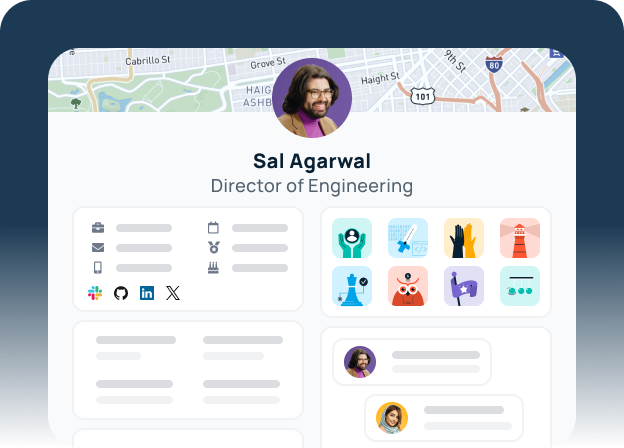
Common Questions About HRIS Limitations
The most common HRIS limitations are: lack of employee engagement features, limited strategic functionality, fragmented data across systems, poor user experience driving low adoption, minimal career development support, and—increasingly—data integrity risks that create compliance exposure under new privacy regulations.
An HRIS manages core employee data, payroll, benefits, and compliance. An HRMS adds workforce management—scheduling, performance, sometimes recruiting. An HCM covers the full employee lifecycle, including onboarding, learning, and succession planning. Vendors apply the terms inconsistently, and the functional overlap is significant.
Most HRIS search is built around exact-match name or ID lookup for administrative tasks. It doesn’t index skills, projects, or expertise, and org chart data refreshes only as often as the sync runs. Employees searching by problem rather than by person get no useful result, so they ask a colleague instead.
The most common pitfalls are poor data migration (inconsistent or incomplete employee records), low user adoption from neglected change management, and misconfigured reporting that never gets fixed post-launch. Most HRIS implementation problems are operational, not technical.
Multi-country or multi-state HRIS setups frequently struggle with inaccurate payroll processing for tax, time, and leave variations; fragmented data governance across HR systems; and compliance exposure when data isn’t properly classified and mapped. These aren’t edge cases—they’re among the top pain points for enterprise HR leaders managing distributed workforces.