


This article is meant to provide you insight on what you should expect to see when attempting to connect your data source to GoProfiles with your Customer Success Manager. Reading this prior to connecting the two platforms can help you walk through the API access smoothly.
Overview
This guide will walk you through how to identify your Namely subdomain and create an API key, both of which are needed to connect your Namely account.
Prerequisites
Please ensure you are an Administrator in your company’s Namely instance.
Instructions
Step 1: Enter your Namely Subdomain in the linking flow.
- if you sign in at “acme.namely.com” enter “acme”.


Step 2: Find your Namely API key.
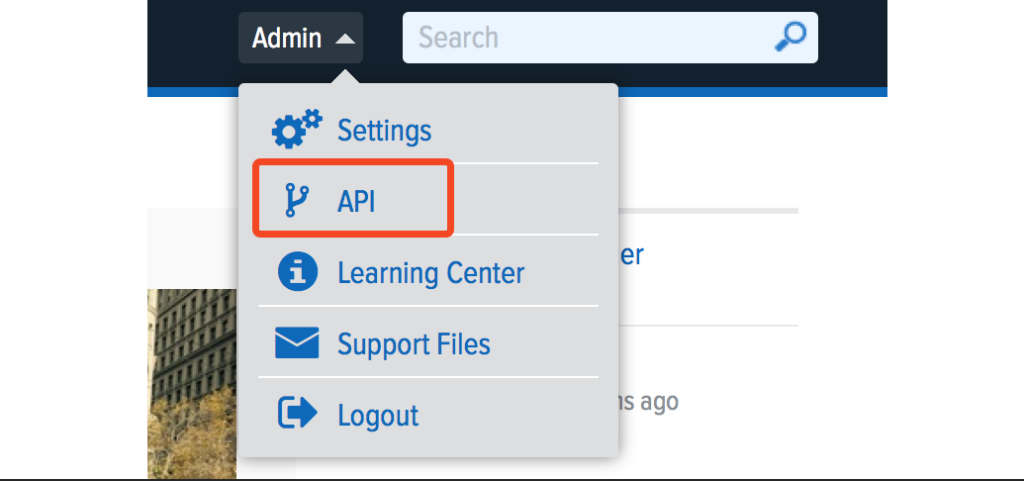
- You will now see a tab for OAuth Applications and a tab for Personal Access Tokens. Click on the Personal Access Tokens tab in the upper left.
- Name your access token and click Create.
- Copy your personal access token and paste it into the linking flow.
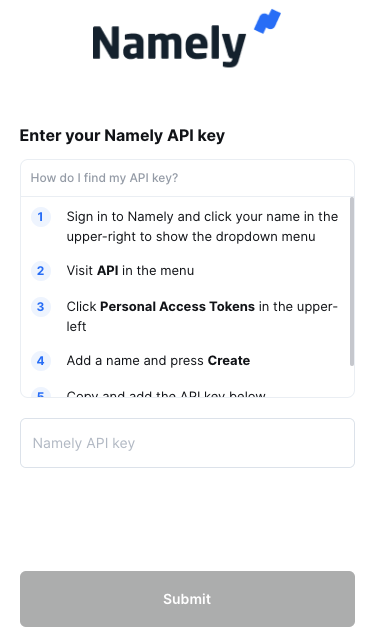
You should now be able to set up the Namely Data Connector with your Customer Success Manager. If you need further assistance, please consult the GoProfiles Help Center or Chat with Us.














