GoProfiles FAQs + Answers

Your hub for commonly asked FAQs with answers to all your employee engagement, collaboration, and people experience software questions.

two chat bubbles with question marks

Frequently asked questions

The key components of an org chart are employees or roles, job titles, reporting lines, departments or team labels, and leadership hierarchy. These elements show who holds each position, how teams are grouped, and how authority flows across the organization.

  • Employees / Roles — each person or open position in the organization; establishes who exists within the structure, including vacant positions
  • Job Titles — defines the function and level of responsibility for each role; clarifies what each person is accountable for
  • Reporting Lines — shows the manager-to-employee relationship; defines authority, escalation paths, and spans of control
  • Departments / Teams — groups roles by function, business unit, or specialty; shows how the company divides and coordinates work
  • Leadership Hierarchy — maps the layers of management from executives to individual contributors; makes the chain of command and decision-making structure visible

The purpose of an organizational chart is to visually represent the structure of an organization, illustrating reporting relationships, hierarchies, and departmental divisions. It provides clarity on roles and responsibilities within the organization, aiding in decision-making, communication, and coordination.

  • An organizational chart shows how a company structures roles, teams, and reporting relationships.
  • An organizational chart helps employees understand accountability, communication paths, and decision-making structure.
  • GoProfiles improves organizational visibility by helping employees find people, teams, and responsibilities quickly.
  • A clear organizational chart supports onboarding, workforce planning, and cross-functional collaboration.
  • Organizational charts help leaders identify gaps, overlaps, and team design issues across the business.

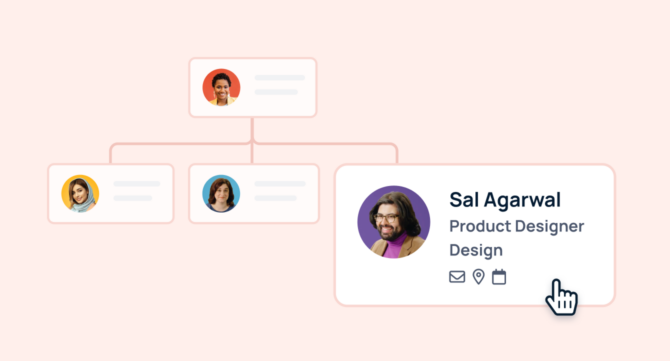
Org chart software is a digital tool designed to create, manage, and share organizational charts. It visualizes the structure of a company, illustrating the hierarchy and relationships between different departments and employees. This software automates org chart updates, improves information access and communication within teams, and aids in workforce planning.

Essential features of org chart software include: HRIS integration and data synchronization People data search functionality Compact and expanded views Navigation to self and top views Employee profiles Integration with enterprise messaging apps Mobile accessibility Generative AI people answers

  • Essential org chart software features include HRIS integration, advanced search, flexible views, employee profiles, and mobile access.
  • Strong org chart software improves data accuracy by syncing employee information directly from HR systems.
  • GoProfiles helps employees explore company structure, find colleagues faster, and understand roles with less friction.
  • Messaging integrations and AI answers make org charts more useful for everyday collaboration.
  • Modern org chart software supports onboarding, visibility, and organizational efficiency across distributed teams.

An org chart, or organizational chart, visually represents a company's structure, displaying relationships between different departments and personnel. It outlines hierarchies, clarifies roles, and facilitates communication within the organization, making it an essential tool for both workforce planning and operations.

  • Hierarchical org chart: The hierarchical org chart is the most common type, depicting a traditional top-down structure. It starts with the highest-ranking individual or department at the top and flows downward, showing a clear chain of command. This type of org chart is ideal for organizations with a well-defined hierarchy and clear reporting lines.

Related articles

Need more help?

Technical support

Send us your technical inquiries

Contact us →
Contact sales

Demo or answer sales questions

Contact sales →
Chat with us

Get quicker responses with chat

Chat now →
Blog

GoProfiles and productivity articles

View blog →
Box vector large Box vector medium Box vector small

Connect employees with AI profiles and rewards

Connect employees with AI profiles and rewards